The Essential Multi-Tool File System Organizer
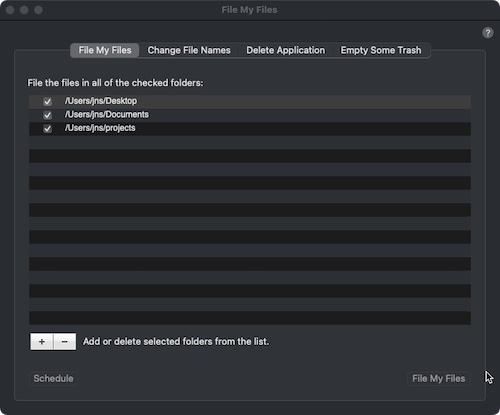
* Clean up your Desktop with one click (see screen shots).
* Schedule FileMyFiles to organize your folders.
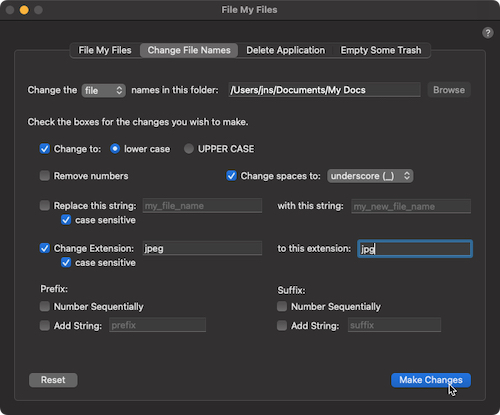
* Powerful options to change all file names in a folder.
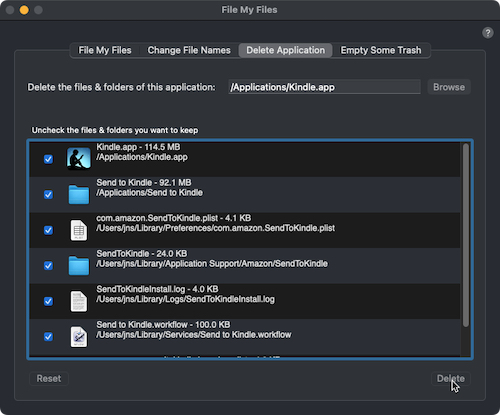
* Delete an application & all related files & folders.

FileMyFiles is now compatible with Sonoma (macOS 14.1).
Check out the Daily App Show video.
* Organize your files
* Change all of the file and/or folder names within a folder easily with a number of powerful options
* Uninstall and Remove applications and all of their related files and folders
Download FileMyFiles and try it free for ten days.
Check out:

 MailSteward
The Ultimate Mac OS X Email Management Solution. Safely archive all of your vital email in a relational database. Easily access your email database with fast, sophisticated searching. Protect your essential email data from data format obsolescence.
* Clean up your Desktop with one click (see screen shots).
* Schedule FileMyFiles to organize your folders.
* Powerful options to change all file names in a folder.
* Delete an application & all related files & folders.
FileMyFiles is now compatible with Sonoma (macOS 14.1).
* Organize your files
* Change all of the file and/or folder names within a folder easily with a number of powerful options
* Uninstall and Remove applications and all of their related files and folders
Download FileMyFiles and try it free for ten days.
Check out:
MailStewardThe Ultimate Mac OS X Email Management Solution. Safely archive all of your vital email in a relational database. Easily access your email database with fast, sophisticated searching. Protect your essential email data from data format obsolescence.